How to Get a Google Review Agent to Help Your Hotel (The Right Way)
Learn what a Google Review Agent is, what it should (and shouldn’t) automate, and a practical workflow for hotels to respond faster without sounding robotic.
Google is the king of hotel reviews. It’s often the first place guests look, and it heavily influences clicks, calls, and direct bookings.
But keeping up with Google reviews can become a full-time job—especially if you manage multiple properties. That’s why many hotel teams look for a Google Review Agent.
The key is doing it the right way: faster replies, better consistency, and no copy/paste spam.
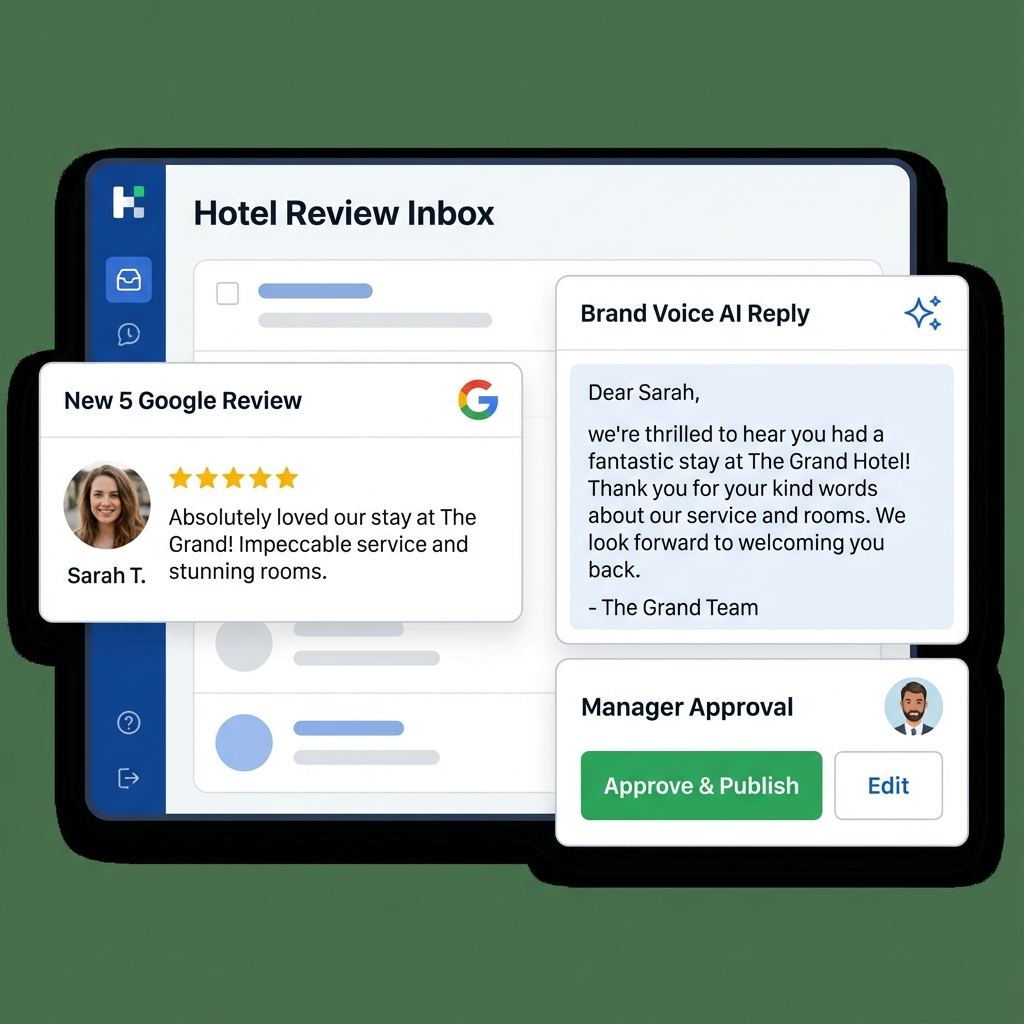
What is a Google Review Agent?
A Google Review Agent isn’t a person—it’s software that helps you run a repeatable review-response workflow.
At a minimum, a good agent should help you:
- Collect Google reviews into one place (especially helpful for multi-location teams).
- Prioritize what needs attention (e.g., 1–2 stars first, brand-sensitive topics, VIP stays).
- Draft a reply in your preferred style (tone, length, language).
- Support approvals so humans stay in control for sensitive cases.
[!NOTE] Some tools describe “auto-posting” as part of the workflow. Whether you publish directly or via a review/approval step, the non-negotiable is the same: every reply must be accurate, specific, and human-approved when needed.
Why You Need One
1) Guests judge you by the replies (not just the ratings)
When people compare hotels, they read the responses—especially on negative reviews. Your reply is public proof of how your team handles problems.
2) Speed matters, but only if it stays personal
Responding quickly (often within 24–48 hours) shows you’re attentive. But generic replies can make a hotel look indifferent.
If you want the “seconds” version, start here: How to Respond to Every Google Review in Seconds
3) Multi-location teams need consistency
Without a system, you get uneven coverage: one property responds daily while another leaves reviews unanswered for a week. A review agent standardizes triage, tone, and approvals.
The Rules: Don’t Get Banned
Google has strict policies against fake engagement and misleading content. Here’s how to stay safe (and credible):
- DON’T buy, post, or request fake reviews.
- DON’T publish the same template reply repeatedly (it reads as spam).
- DON’T share personal data about the guest or reservation details publicly.
- DO respond with specifics that match the review.
- DO keep a human in the loop for negatives, legal/safety issues, and edge cases.
For handling complaints step-by-step, see: How to Respond to Negative Hotel Reviews
What a good Google Review Agent should include
When you compare tools, look for these capabilities:
- One inbox for Google + OTAs so Google doesn’t get neglected during busy weeks.
- Tone controls and templates so replies sound like your brand (not a chatbot).
- Manager approvals for 1–2 star reviews and sensitive topics.
- Multi-language drafts if you host international guests.
- Reporting (response time, response rate, recurring themes) to improve operations.
How to set it up (a practical workflow)
Here’s a setup that works for most hotels:
Step 1: Define your triage rules
- 1–2 stars: manager approval required
- 3 stars: respond with empathy + one concrete improvement
- 4–5 stars: short thanks + one specific highlight + invite back
Step 2: Lock in your brand voice
Pick a default tone (professional, friendly, luxury, etc.), then decide what “good” looks like:
- 2–5 sentences
- one specific detail (“breakfast”, “check-in”, “location”, “quiet room”)
- one clear next step for negatives (offline contact path)
Step 3: Use “template + proof” personalization
Templates keep you fast. The “proof” detail keeps you human.
If you want a complete library of scenarios, use: Hotel Review Response Templates
How to Set It Up
Tools like Review Agent make this easy: 1. Connect: Add your property (or multiple locations) and start pulling reviews into one queue. 2. Configure: Set tone and basic rules (what needs approval, what can be handled by staff). 3. Draft: Generate high-quality response drafts in seconds. 4. Approve: Managers review sensitive cases before publishing.
FAQ
Do we have to respond to every Google review?
It’s best practice for hotels, especially for negative and mixed reviews. Consistency is what future guests notice.
Will AI replies sound robotic?
They do if you publish them unchanged. The fix is simple: keep a consistent structure and add one “proof” detail so every response is unique.
Want a simple system? Read: The Importance of Responding to Reviews Individually
Conclusion
A Google Review Agent is most useful when it improves speed and consistency without sacrificing credibility. For hotels, that means: centralized inbox, fast drafts, clear triage, and the right approvals.
Ready to automate your Google reviews? Connect your hotel to Review Agent today.
Share this Article
Link copied!